
It's video app review time!
Showing posts with label iPad. Show all posts
Showing posts with label iPad. Show all posts
Monday, September 26, 2011


Monday, March 28, 2011
Window on the World
I'm certain I've mentioned this before, but my early fascination with political maps stemmed from an unquenchable curiosity about far away lands. My early thoughts taught me many things.


Although I think that was because of the song my dad sang "Way down among Brazilians Coffee beans grow by the billions". Interestingly enough, I thought the word was "Brazilia". There was also a time where I thought the word was "Vermilion", as in, Ohio.
And due to a presentation in 4th grade, I learned that China, for the most part, looked like this:


I imagined that most of Africa looked like this:
I was certain all of Russia looked like this:

I was confident Brazil looked like this:

I was confident Brazil looked like this:

Although I think that was because of the song my dad sang "Way down among Brazilians Coffee beans grow by the billions". Interestingly enough, I thought the word was "Brazilia". There was also a time where I thought the word was "Vermilion", as in, Ohio.
And due to a presentation in 4th grade, I learned that China, for the most part, looked like this:

This was my "Window on the World" version 0.5
Version 1.0 of the Window on the World, Google Earth, wouldn't come for another 15 years.
I must give credit where credit is due. My dad was the one who coined (at least in my mind) the Window on the World concept. He first mentioned it in this 15 year gap. The original idea was live video feeds from all over the world which could be viewed like channels. While it has been implemented in several ways, I can't think of a good, inclusive site, app or anything that does what he described.
I must give credit where credit is due. My dad was the one who coined (at least in my mind) the Window on the World concept. He first mentioned it in this 15 year gap. The original idea was live video feeds from all over the world which could be viewed like channels. While it has been implemented in several ways, I can't think of a good, inclusive site, app or anything that does what he described.
Google Earth was so great because it made it possible to actually see these places, through a shiny new digital lens. Perhaps not the Window on the World my dad described but something that allowed me to replace my imaginary or outdated images with real imagery. With the addition of the Control+alt+a flight simulator, I could fly anywhere in the world in an SR22 prop place. That would be version 1.0.1
Street view brought us up to Window on the World version 2.0. Truth be told, what pushed me over the early-adopter-versus-buyers-remorse teeter-totter on the iPad was the ability to zoom around the street view images of far away lands (read select European cities). Straight out of the ad to my local apple store, I'm pretty sure the first place I looked at was the Eiffel Tower - that doesn't make sense for me though, I must have seen the commercial too many times. It's a good thing the iPad 2 commercials don't include some minor advancement in streetview functionality or I probably would have been waiting in line on March 11th. My reality is becoming Apple commercials. Also of note, I've looked up Apple's stock symbol (AAPL) so many times that it takes me a couple seconds to remember how to actually spell apple...the Newtonian spelling.
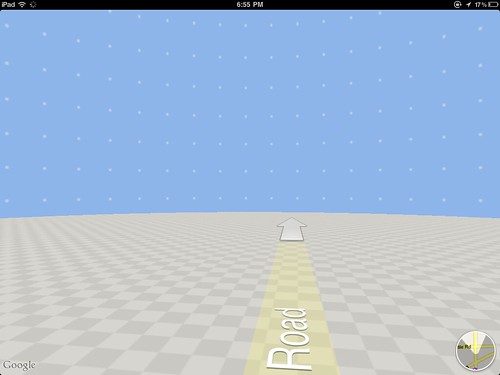
With the iPad (version 1.0 for those who pay attention to such trivial things), I'm left with a good streetview portal that forces me to put up with this screen more often than I'd like.
For any iPad Google map users out there, you probably find the above image hilarious, and you should. For those that don't, well, go get an iPad...or an iPad2.
The version upgrade to 2.0 made the earth more accessible than every before...well, half of it (the map below shows the coverage area). That is still an issue (another being that I told myself I wouldn't use parenthetical humor or sarcasm more than twice in this post). Perhaps this is more like Window on the World 2.0 beta. Or version 1.9, the one that everyone is scared to download to their phone.

That brings us to the topic of today's post, something you've probably been wondering about since you started reading! After feeling guilty (guilty isn't the right word but I can't think of anything better) about my mildly scathing review of National Geographic's World Atlas update, I think it's important I throw out an iPad app for you to enjoy, or at least one you can enjoy vicariously through your techy counterparts.
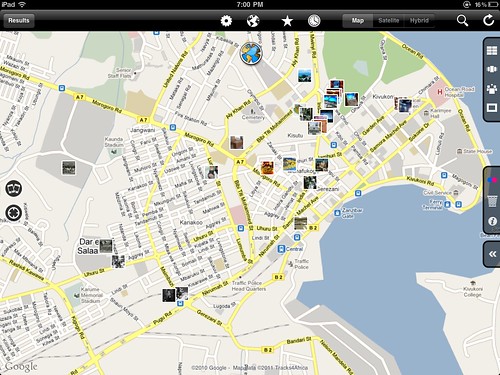
What this app can do dwarfs the fact that it is one of the most unintuitive things I've used on the iPad. That, of course, can be remedied through practice. I'm willing to take time and learn with an app that truly merges photography and geography. A few more minutes went a long way this evening.
The fact is, this app is not a new concept but a fantastic implementation. Panoramio is a great website to go to and they actually have an iPhone app, but the fact that they DON'T have an iPad app tells you that it is much more about user contributions than searching the database. While the ability to contribute is great, my focus is the window on the world version 3.0.
This app adds the flickr library to geo searches. Its fluid, responsive, and not very buggy. They really tried to Apple-up the concept and even have cover flow functionality to look through selected pictures. While many have tried, no one, including this app has been able to really replicate the cover flow motion of the iPhone.
Being able to search the globe, and this quite literally is the ENTIRE globe, for pictures from other geo explorers is something that gets me excited about the next version of my Window on the World, whatever it may be.
This app adds the flickr library to geo searches. Its fluid, responsive, and not very buggy. They really tried to Apple-up the concept and even have cover flow functionality to look through selected pictures. While many have tried, no one, including this app has been able to really replicate the cover flow motion of the iPhone.
Being able to search the globe, and this quite literally is the ENTIRE globe, for pictures from other geo explorers is something that gets me excited about the next version of my Window on the World, whatever it may be.
Monday, March 21, 2011
World Atlas iPad App Video Review
Last June I wrote a post defending National Geographic's World Atlas app for iPad and iPhone. The reviews in the app store were abysmal, climbing to a high of three and a half stars (a number that wouldn't even impress Ed McMahon).
After nearly a year, the wait is over, World Atlas 2.0 is here. Too bad they didn't listen to any of our concerns, instead, opting for improvements that do little to improve its functionality. But, in the words of Levar Burton, you don't have to take MY word for it...actually you do, see my video review below.
Well National Geographic, thanks for trying...I guess.
After nearly a year, the wait is over, World Atlas 2.0 is here. Too bad they didn't listen to any of our concerns, instead, opting for improvements that do little to improve its functionality. But, in the words of Levar Burton, you don't have to take MY word for it...actually you do, see my video review below.
Well National Geographic, thanks for trying...I guess.
Tuesday, July 20, 2010
Kayaking Just Got Better
The first time I ever used the Kayak.com search engine for flights, I found a flight for 700 dollars less than I was prepared to pay. Since then it has been THE place I look for the best flight and vacation prices.
Naturally I got the app for the iPhone and iPad and most recently for my HTC EVO.
After learning about Google's planned take over of ITA who is the data provider Kayak uses, I became worried that Google would push the upstart kayak right out of the market but kayak has outdone themselves with the most recent update to both the mobile apps (iPad in particular) and the full website.

The iPad app was completely redone to take advantage of the large screen. While the mobile app is nice, it feels very...mobile.
The large screen on the iPad also allows for quick searches, a must when you are searching for more than just a single date or location. The history of searches, located in the center provides easy access to recent searches.
Search Screen

But it's the new Explore feature in Kayak which has not only raised, but redefined the bar for travel websites. Explore lets kayak help you find a destination based on cost, flight characteristics, timing and cost. I have been waiting for a feature that would allow me to ask "where can I go given these parameters?" Kayak.com has delivered. With the broadest set of search criteria, travel is possible nearly everywhere. This makes it simple to find deals, like 410 dollars to Bogota or 580 to Amsterdam.
World Map with Explore Dots

Once you zoom in on the map (a dream using multi-touch) the dots turn into the best available fare and you are on your way to a great vacation!
Montevideo

Thanks again to the folks at kayak.com and happy travels!
Naturally I got the app for the iPhone and iPad and most recently for my HTC EVO.
After learning about Google's planned take over of ITA who is the data provider Kayak uses, I became worried that Google would push the upstart kayak right out of the market but kayak has outdone themselves with the most recent update to both the mobile apps (iPad in particular) and the full website.

The iPad app was completely redone to take advantage of the large screen. While the mobile app is nice, it feels very...mobile.
The large screen on the iPad also allows for quick searches, a must when you are searching for more than just a single date or location. The history of searches, located in the center provides easy access to recent searches.
Search Screen

But it's the new Explore feature in Kayak which has not only raised, but redefined the bar for travel websites. Explore lets kayak help you find a destination based on cost, flight characteristics, timing and cost. I have been waiting for a feature that would allow me to ask "where can I go given these parameters?" Kayak.com has delivered. With the broadest set of search criteria, travel is possible nearly everywhere. This makes it simple to find deals, like 410 dollars to Bogota or 580 to Amsterdam.
World Map with Explore Dots

Once you zoom in on the map (a dream using multi-touch) the dots turn into the best available fare and you are on your way to a great vacation!
Montevideo

Thanks again to the folks at kayak.com and happy travels!
Thursday, June 17, 2010
Google Earth on the iPad
Well over a month after iPads hit stores in the US, the folks at Google have finally released an update to the Google Earth application, including native support for the iPad.
It's about damn time.
Previously the only way to use GE on the iPad was using the iPhone app and the pixel doubler. While it's nice that, as Apple puts it, you can choose from over 200,000 iPhone and iPod touch apps in the App Store, iPad owners know the pixel doubler was basically to allow the promotion of the "over 200,000 apps" pitch. This was painfully apparent with the iPhone Google Earth app. The LatLong blog even said "Some iPad users have noticed that Google Earth has been available for the iPad from the very beginning, but until today, this has simply been the iPhone version running in a scaled-up mode." HA!
Now Google Earth is available in much of its glory on the iPad. The layers are the same available from version 2 of the iPhone GE app with the addition of roads as shown below.

The settings button allows easy toggling of the auto-tilt feature which seems to work much better on the iPad. The user gets the sense of picking up a window on the world. As this update will likely be the last one before iPhone 4, I wonder if there will be additional auto-tilt functionality given the addition of a gyroscope. Side-to-side tilt would really add to the user-experience on the iPad, we'll first have to see if it works on the iPhone.

Overall Google Earth works swimmingly on the iPad, but I do have a few complaints and reservations. I don't understand why the Google Earth functionality can't be added in to the Google Maps application. Satellite imagery is already there, add the ability to sign in to your maps account, add more layers and zoom out to globe (as an option) and you've virtually elimnated the need for the Google Earth app all together. Also, there are a couple of bugs that come with signing in with ones maps account. The Google servers see the application as a third party and do not recognize it. That's not too bad in itself but it is a little silly when Google doesn't recognize itself as "Google Earth". I'm assuming this silly little quirk will be fixed in the next update.

Another frustration is that the panoramio icons don't appear in the Google Earth iPad app until the user is zoomed in much farther than in it's PC counterpart. As someone who uses this layer quite a bit exploring exotic areas all over the wolrd, it's sometimes difficult to know where imagery is available.
I was also really hoping to be able to load, create and record tours. I think the iOS would provide a very immersive tour creation platform. Alas, that is relegated to the wish list.
Overall its a vast improvement over the previous release as far as the iPad is concerned but if the functionality could simply be added to the Google Maps application, standard on the iPad, the more streamlined product would likely be better utilized.
Update:
Check out my video review on Youtube:
It's about damn time.
Previously the only way to use GE on the iPad was using the iPhone app and the pixel doubler. While it's nice that, as Apple puts it, you can choose from over 200,000 iPhone and iPod touch apps in the App Store, iPad owners know the pixel doubler was basically to allow the promotion of the "over 200,000 apps" pitch. This was painfully apparent with the iPhone Google Earth app. The LatLong blog even said "Some iPad users have noticed that Google Earth has been available for the iPad from the very beginning, but until today, this has simply been the iPhone version running in a scaled-up mode." HA!
Now Google Earth is available in much of its glory on the iPad. The layers are the same available from version 2 of the iPhone GE app with the addition of roads as shown below.

The settings button allows easy toggling of the auto-tilt feature which seems to work much better on the iPad. The user gets the sense of picking up a window on the world. As this update will likely be the last one before iPhone 4, I wonder if there will be additional auto-tilt functionality given the addition of a gyroscope. Side-to-side tilt would really add to the user-experience on the iPad, we'll first have to see if it works on the iPhone.

Overall Google Earth works swimmingly on the iPad, but I do have a few complaints and reservations. I don't understand why the Google Earth functionality can't be added in to the Google Maps application. Satellite imagery is already there, add the ability to sign in to your maps account, add more layers and zoom out to globe (as an option) and you've virtually elimnated the need for the Google Earth app all together. Also, there are a couple of bugs that come with signing in with ones maps account. The Google servers see the application as a third party and do not recognize it. That's not too bad in itself but it is a little silly when Google doesn't recognize itself as "Google Earth". I'm assuming this silly little quirk will be fixed in the next update.

Another frustration is that the panoramio icons don't appear in the Google Earth iPad app until the user is zoomed in much farther than in it's PC counterpart. As someone who uses this layer quite a bit exploring exotic areas all over the wolrd, it's sometimes difficult to know where imagery is available.
I was also really hoping to be able to load, create and record tours. I think the iOS would provide a very immersive tour creation platform. Alas, that is relegated to the wish list.
Overall its a vast improvement over the previous release as far as the iPad is concerned but if the functionality could simply be added to the Google Maps application, standard on the iPad, the more streamlined product would likely be better utilized.
Update:
Check out my video review on Youtube:
Thursday, June 10, 2010
National Geographic iPad App Video Review
I'm tired of people bashing the new National Geographic app for the iPad. Sure, there are a few ways the app could be improved but in general it is a great tool for viewing the best paper maps in the world.
Below is my video review of this misunderstood and under appreciated iPad application.
That all being said, it's been months NatGeo, time to get a few of the bugs fixed!
Below is my video review of this misunderstood and under appreciated iPad application.
That all being said, it's been months NatGeo, time to get a few of the bugs fixed!
Subscribe to:
Posts (Atom)


